Payment Gateway via Link
How to Generate a Payment Link in an Email (Without the Risk of Payment Expiration)?
E-shops often need to send customers a payment link via email. However, customers may read the email after a longer delay. If the e-shop creates the payment in the Comgate system at the moment the email is sent, the payment expiration would already be running. This could result in a situation where the customer opens the email too late and is no longer able to complete the payment. Therefore, the e-shop should send an email containing a link that creates the payment only when the customer clicks it.
Typical examples of sending a payment link include:
- sending an invoice
- reminding the customer about an unpaid order
- manual order creation by an operator
- restoring a cancelled or unsuccessful payment
Correct Solution: Generate the Payment Only When the Customer Clicks the Email Link
Instead of a direct link to the payment gateway, the email should contain a link to your e-shop script, for example:
<a href="www.eshop.cz/generuj-platbu.php?objednavka=112233&token=we498xvrgh4b9we">Pay for the order</a>
This script:
If the e-shop creates the payment immediately when sending the email:
- Verifies the parameters (order ID + verification code) so a potential attacker cannot iterate through order numbers.
- Checks that the order exists and hasn’t already been paid.
- Creates a new payment via the Comgate API.
- Stores the link between the order and the created payment.
- Redirects the customer to the payment gateway.
The payment is therefore created at the exact moment when the customer clicks the link in the email.
- Send a link to your endpoint in the email.
<?php
// Create an order ID and a secure token
$order_id = 112233;
$secure_token = bin2hex(random_bytes(16)); // Minimum token, in practice longer and stored in the DB

// Build the link
$link = "https://eshop.cz/pay?order={$order_id}&token={$secure_token}";

// Send the email (use a better library than mail() in production)
mail(
    "customer@example.com",
    "Payment for order 112233",
    "Pay here: " . $link,
    "From: Store <sender@eshop.cz>"
);
- When the customer arrives at the endpoint
https://eshop.cz/pay?order=<id>&token=<secureToken>
<?php

// Get parameters from the URL
$order_id = intval($_GET['order']) ?? null;
$secure_token = $_GET['token'] ?? null;

// Load the order from the DB
$orderData = $this->db->query(
    "SELECT amount, currency, email, secure_token, status FROM objednavka WHERE id = :order_id AND token = :token",
    ['order_id' => $order_id, 'token' => $secure_token]
);

// e.g. using the PHP SDK https://github.com/comgate-payments/sdk-php
$comgateSDKclient = Comgate::defaults()
    ->setMerchant('123456')
    ->setSecret('foobarbaz')
    ->createClient();

$payment = new Payment();
$payment
    ->setPrice(Money::ofInt($orderData['amount']))
    ->setCurrency($orderData['currency'])
    ->setEmail($orderData['email'])
    ->setFullName(...)
    ...

try {
    $createPaymentResponse = $comgateSDKclient->createPayment($payment);
    if ($createPaymentResponse->getCode() === RequestCode::OK) {
        $this->db->query("INSERT INTO platba_objednavky (objednavka_id, kod_platby, ...) VALUES ...");

        // Redirect the customer to the payment gateway
        Helpers::redirect($createPaymentResponse->getRedirect()); // header("Location: " . $redirect_url)

    } else {
        var_dump($createPaymentResponse->getMessage());
    }
} catch (ApiException $e) {
    var_dump($e->getMessage());
}
Further information about the method create.
Sequence diagram of the process
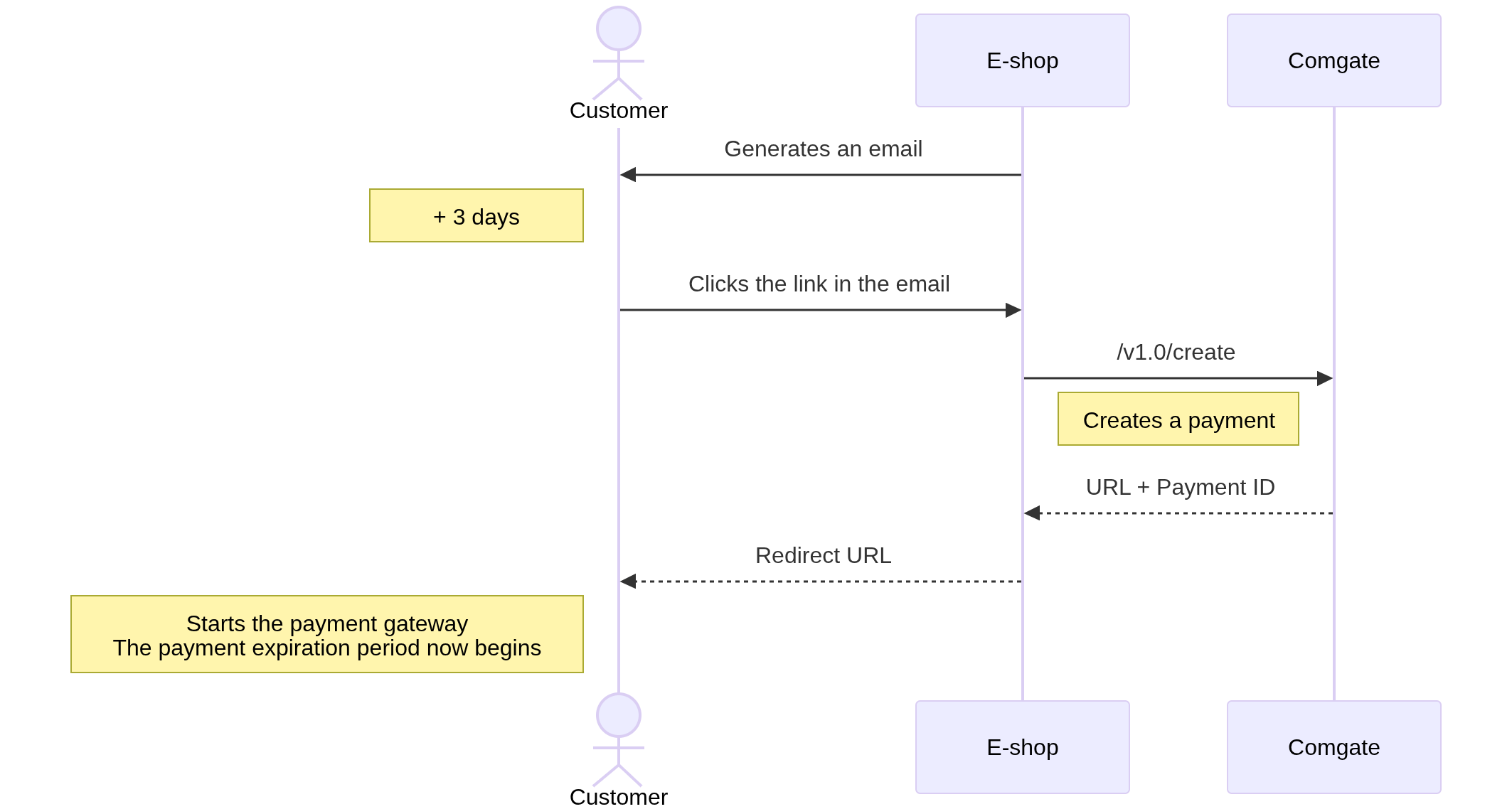
- The e-shop sends an email
- It does not create a payment.
- It contains only a secure link to the e-shop’s own script.
- The customer clicks the link
- The order is verified.
- A payment is created via the API.
- The API returns the payment URL.
-
The payment expiration starts at this moment
-
The customer pays
- The order is marked as paid.
Security Measures
To prevent a situation where an attacker could browse all your orders simply by changing the order ID in the URL, add a verification token.
- Do not use only the order ID.
- Always use a verification code, token, or a signed link.
- The token should be:
- random,
- sufficiently long,
- time-unlimited or have a clearly defined validity period.
Problem: Payment Created Too Early
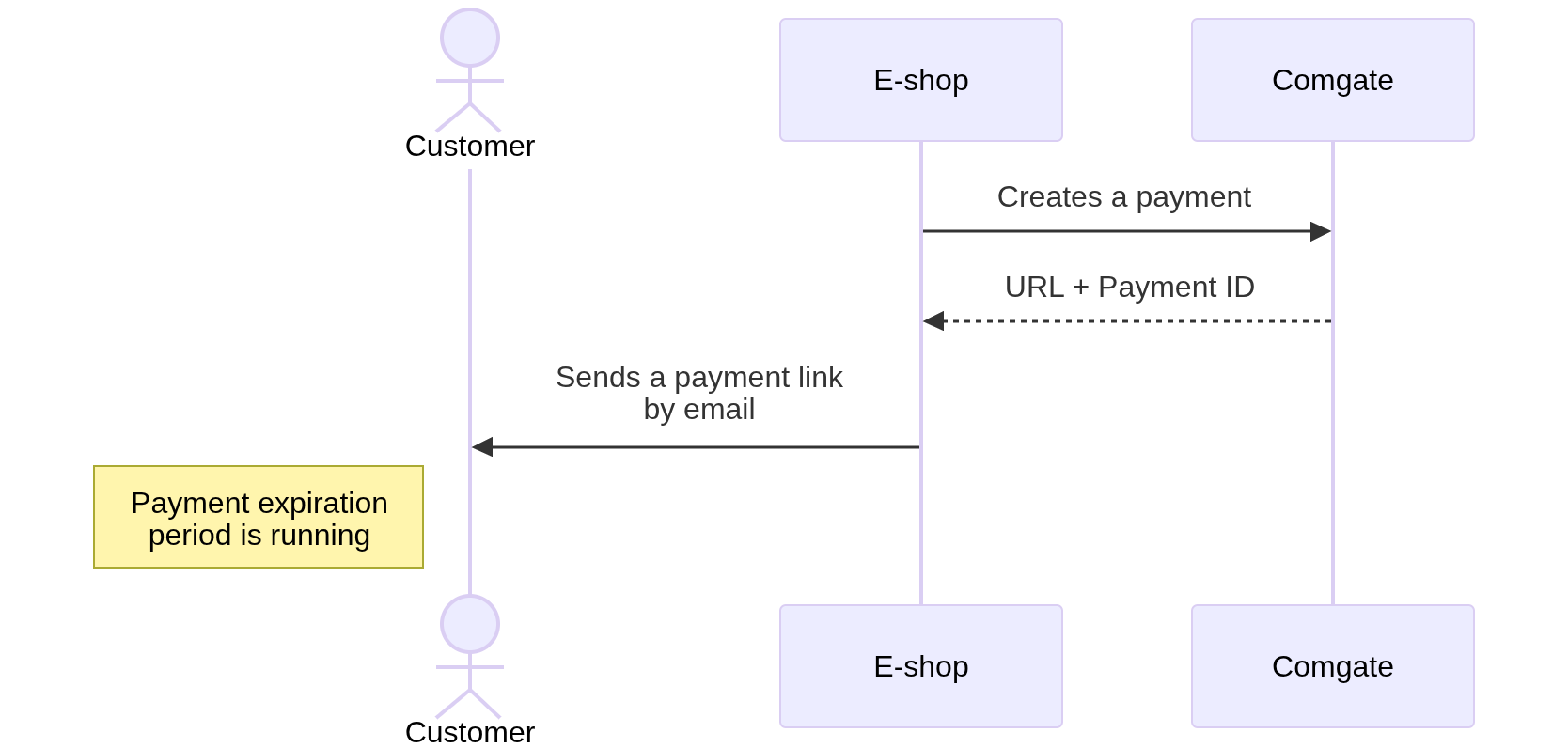
If the e-shop creates the payment immediately when sending the email:
- the payment has a limited validity period (e.g. several days),
- the customer may read the email later,
- the payment may already be invalid,
- the payment expiration period starts running immediately from the moment it is created.