Payment statuses
The payment status reflects the current result or processing phase of a given transaction. Each status matters for correctly steering what happens next - for example, when a service can be made available, when it is necessary to wait for authorization, or when a payment can be closed without further action.
The statuses listed below will help you understand which phase a payment is in and how to react accordingly in your system.
| Status | Final status | Description |
|---|---|---|
PENDING | No | The payment has been created, but its result is not yet known - the transaction is being processed and is still in progress. |
AUTHORIZED | No | The payer has successfully pre-authorized the card payment - to complete the transaction it is necessary to request the debit of the pre-authorized amount. |
PAID | Yes | The payer has successfully completed the payment - the goods can be issued or the ordered service made available. |
CANCELLED | Yes | The payment was not completed successfully - the goods will not be issued and the service will not be provided. |
A payment can be considered successfully paid only in the PAID status. Statuses such as PENDING and AUTHORIZED are not terminal and may be followed by the CANCELLED status.
Terminal statuses
The PAID and CANCELLED statuses are terminal. Once a payment transitions into one of them, it stays there permanently and does not change any further.
Sequence diagram
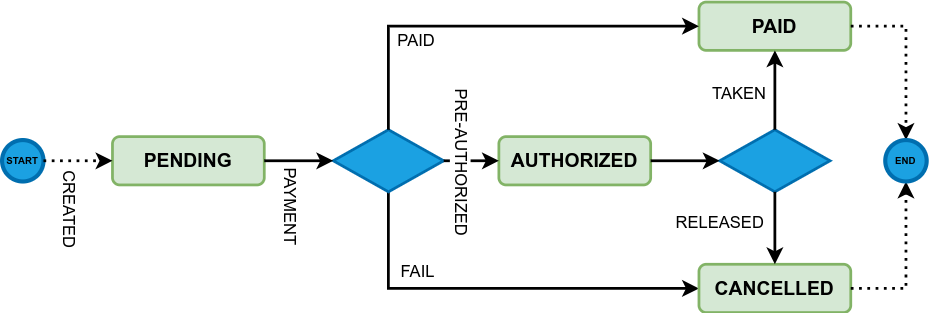
The following sequence diagram shows how the payment statuses progress during processing. It describes the individual steps and status changes that occur from the creation of the payment until its successful completion or cancellation.
Payment attempt
Besides the payment itself, Comgate also distinguishes so-called payment attempts. In common integrations you will usually not come across this concept and there is no need to study it in detail.
Continue reading only if you are implementing native Apple Pay or Google Pay buttons in a mobile application.
Payment attempt statuses
The diagram above shows how the statuses of the whole payment progress. Payment attempts go through the same statuses, but they have specifics that are worth knowing when implementing native Apple Pay and Google Pay buttons.
Each payment attempt has its own life cycle and is fully independent of the other attempts. It therefore represents a separate instance within the life cycle of a single payment.
The following rules apply when working with payment attempts:
-
Each payment attempt has its own status - individual payment attempts may have different statuses that differ from the status of the whole payment.
-
One successful attempt is enough - if at least one payment attempt is in the
PAIDstatus, the whole payment is considered successfully completed and also transitions to thePAIDstatus (the same applies toAUTHORIZED). All other unfinished attempts (PENDING) are cancelled (CANCELLED) at that moment. -
An unsuccessful attempt does not end the payment - if one of the attempts fails (
CANCELLED), the payment can continue with further attempts. The status of the whole payment stays open (PENDING). -
Cancelling the payment also cancels attempts in progress - as soon as the whole payment transitions to the
CANCELLEDstatus, all of its attempts in progress (PENDING) are cancelled immediately. -
The payment is cancelled as a whole - this happens, for example, when the time limit expires or when the payer or the e-shop cancels it manually.
It is important to realise that some payment attempt statuses have a direct effect on the result of the whole payment, while others do not affect it and allow the process to continue with another attempt.
How to behave in individual statuses
The following table is split into two parts - the first concerns the payment itself, the second focuses on payment attempts. For each status there is an explanation of its meaning and the recommended way to proceed at that moment within your application logic.
| Status | Final payment status | Description |
|---|---|---|
| Payment - represents the overall processing result | ||
PENDING | No |
|
PAID | Yes |
|
AUTHORIZED | Yes and No |
|
CANCELLED | Yes |
|
| Payment attempt - the status of an individual attempt within one payment | ||
PENDING | No |
|
PAID | Yes |
|
AUTHORIZED | Yes |
|
CANCELLED | No |
|