POS QR REST API (1.0)
The QR REST API connects a cash register or other business system to Comgate over the Internet and lets you initiate a QR / account payment on a payment terminal and subsequently determine its result. We only support the JSON data format. The process of processing one transaction usually consists of the following steps:
Authentication (mandatory first step)
Call the POST /pos/auth-api/authenticate method with HTTP Basic credentials (header Authorization: Basic [base64_encode(user:password)]). The API returns a JWT token and its expiry. Use this token in the Authorization: Bearer [token] header for all QR API calls until it expires; after that, authenticate again.
Creating a payment (mandatory step)
Call the POST /pos/qr-api/payment method and pass the mandatory data: merchantId, terminalId, amount (in minor units), currency and method; optionally refId and created. If the request is correct, the API returns a unique transaction identifier transId and paymentData for rendering the QR code. Save the transId, it is key for all further operations with this payment.
Determining the payment status (optional step)
Repeatedly call the GET /pos/qr-api/payment/{transId} method until the status changes from 'PENDING' to a final value. Possible final states are:
- PAID – payment was successful,
- CANCELLED – payment was cancelled, rejected, not completed correctly or timed out.
Cancel payment (optional step)
If you need to cancel a payment that has not yet reached a final state, call the
POST /pos/qr-api/payment/{transId}/cancel method. The response contains the resulting status ('CANCELLED').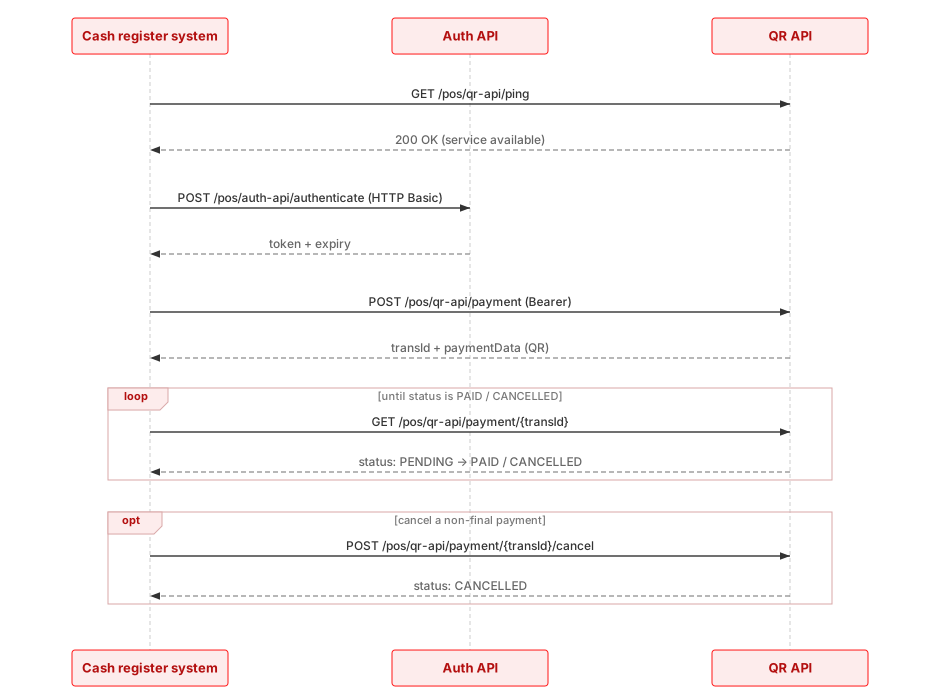
Security and authorization
To ensure the integrity and confidentiality of transmitted data, all communication takes place exclusively over the encrypted HTTPS protocol and the data format is JSON. Every QR API request must contain the authorization headerAuthorization: Bearer [token] with a valid JWT token obtained from the Auth API. The token has a limited validity (expiry); after it expires, obtain a new one via POST /pos/auth-api/authenticate.
Obtain access token
Verifies HTTP Basic credentials and returns a JWT Bearer token used to authorize the QR API. Pass credentials in the Authorization: Basic [base64_encode(user:password)] header. A merchant identifier mid is REQUIRED in the JSON body (400 without it) — it is baked into the token and all subsequent QR API operations are restricted to that merchant (requests for another merchant or payments of another merchant return 403).
Authorizations:
Request Body schema: application/jsonrequired
| mid required | string Merchant identifier baked into the token (MID scoping). |
Responses
Response Schema: application/json
| token | string JWT Bearer token. |
| expiry | string Token expiration (ISO 8601). |
Response Schema: application/json
| errorMessage | string Error message. |
Response Schema: application/json
| errorMessage | string Error message. |
Response Schema: application/json
| errorMessage | string Error message. |
Request samples
- Payload
- cURL
- PHP
- Java
- Python
- C#
- Swift
{- "mid": "MERCH001"
}Response samples
- 200
- 400
- 401
- 405
{- "token": "eyJhbGciOiJIUzI1NiIsInR5cCI6IkpXVCJ9.eyJzdWIiOiJNT05FVCJ9.dummy-signature",
- "expiry": "2026-06-18T10:15:00+00:00"
}Available payment methods
Returns the QR payment methods available for the given terminal and currency (bank-specific QR methods and the generic QR transfer), including bank names and logos. For EUR the offer follows the merchant's establishment country (SK → the SK QR method, otherwise the EU QR method); with bothEurQr both SK and EU QR methods are returned. Methods are also filtered by supported amount and instant-payment limits based on the mandatory amount.
Authorizations:
Request Body schema: application/jsonrequired
| merchantId required | string Merchant identifier. |
| terminalId required | string Terminal identifier. |
| currency required | string ISO 4217 currency code (CZK or EUR). |
| amount required | integer >= 1 Amount in minor units (e.g. hellers/cents) — filters methods by supported amount and instant-payment limits. |
| bothEurQr | boolean Optional; for EUR returns both SK and EU QR methods regardless of the establishment country. |
| lang | string Optional language of method names (cs/sk/en, default cs). |
Responses
Response Schema: application/json
Array of objects | |||||||||
Array
| |||||||||
Response Schema: application/json
| errorMessage | string Error message. |
Response Schema: application/json
| errorMessage | string Error message. |
Response Schema: application/json
| errorMessage | string Error message. |
Request samples
- Payload
- cURL
- PHP
- Java
- Python
- C#
- Swift
{- "merchantId": "MERCH001",
- "terminalId": "TERM001",
- "currency": "CZK",
- "amount": 12500,
- "bothEurQr": false,
- "lang": "cs"
}Response samples
- 200
- 400
- 401
- 403
{- "methods": [
- {
- "id": "BANK_CZ_T_OTHER",
- "name": "České banky",
}
]
}

Create payment
Creates a new QR payment. On success it returns the transaction identifier transId and the payment data needed to render the QR code.
Authorizations:
Request Body schema: application/jsonrequired
| merchantId required | string Merchant identifier. |
| terminalId required | string Terminal identifier. |
| refId | string Optional merchant payment reference. It appears on the merchant's settlement statement (the |
| amount required | integer >= 1 Amount in minor units (e.g. hellers/cents). |
| currency required | string ISO 4217 currency code. |
| method required | string Payment method, e.g. |
| created | string Optional payment creation timestamp (ISO 8601). |
| variableSymbol | string <= 128 characters Optional variable symbol entered by the operator - the merchant's own reference stored with the payment. Any text up to 128 bytes; longer values or NUL return 400. When it is filled it is the value that appears on the merchant's settlement statement (the |
Responses
Response Schema: application/json
| transId | string Transaction identifier. |
| refId | string Merchant payment reference (echo of the request). |
| status | string Payment status; right after creation it is PENDING. |
| paymentData | string Payment QR code data; the format follows the method: SPAYD for CZ methods, PAY by square for BANK_SK_T_OTHER, EPC QR (SEPA) for BANK_EUR_T_OTHER. Not present for a CANCELLED payment. |
| paymentRejectedReason | string Reason for rejection; present only for a CANCELLED payment. |
Response Schema: application/json
| errorMessage | string Error message. |
Response Schema: application/json
| errorMessage | string Error message. |
Response Schema: application/json
| errorMessage | string Error message. |
Request samples
- Payload
- cURL
- PHP
- Java
- Python
- C#
- Swift
{- "merchantId": "MERCH001",
- "terminalId": "TERM001",
- "refId": "ORDER-2026-001",
- "amount": 12500,
- "currency": "CZK",
- "method": "BANK_CZ_T_OTHER",
- "created": "2026-05-27T10:00:00Z",
- "variableSymbol": "FAKTURA-2026/01"
}Response samples
- 200
- 400
- 401
- 403
{- "transId": "AAAA-BBBB-CCCC",
- "refId": "ORDER-2026-001",
- "status": "PENDING",
- "paymentData": "SPD*1.0*ACC:CZ6508000000192000145399*AM:125.00*CC:CZK*MSG:Platba ORDER-2026-001",
- "paymentRejectedReason": "string"
}Payment status
Returns the current state of the payment. Poll until status reaches a final value (PAID / CANCELLED).
Authorizations:
path Parameters
| transId required | string Example: AAAA-BBBB-CCCC Transaction identifier. |
Responses
Response Schema: application/json
| transId | string Transaction identifier. |
| refId | string Merchant payment reference. |
| status | string Payment status: PENDING, PAID or CANCELLED. |
| paymentRejectedReason | string Reason the payment was cancelled; present only for a CANCELLED payment. The values are stable and can be used as keys: |
Array of objects Refunds of this payment in chronological order; an empty array if there are none. Use it to recover |
Response Schema: application/json
| errorMessage | string Error message. |
Response Schema: application/json
| errorMessage | string Error message. |
Response Schema: application/json
| errorMessage | string Error message. |
Request samples
- cURL
- PHP
- Java
- Python
- C#
- Swift
# You can also use wget
curl -X GET https://payments.comgate.cz/pos/qr-api/payment/{transId} \
-H 'Authorization: Bearer eyJhbGciOiJIUzI1NiIsInR5cCI6IkpXVCJ9.eyJzdWIiOiJNT05FVCJ9.dummy-signature'
Response samples
- 200
- 401
- 403
- 404
{- "transId": "AAAA-BBBB-CCCC",
- "refId": "ORDER-2026-001",
- "status": "PAID",
- "paymentRejectedReason": "Customer timeout",
- "refunds": [
- {
- "transRefundId": "123456",
- "refId": "REFUND-001",
- "amount": 2000
}
]
}Change the bank on a pending payment
Rewrites the payment method on an EXISTING pending payment and restarts its expiry, so that going back to the bank list does not create a second payment for one purchase. The response has the same shape as creating a payment, plus the new expiry. Nothing is written until every check passes, so a rejected request leaves the payment usable with its ORIGINAL method - pick another bank and call again. The number of changes is not limited and the expiry is never shortened. Amount limits are not re-checked here: the amount does not change, so the list from /methods still applies.
Authorizations:
path Parameters
| transId required | string Example: AA25-FD8D-9GF5 |
Request Body schema: application/jsonrequired
| method required | string Method identifier from /methods. |
Responses
Response Schema: application/json
| transId | string |
| refId | string or null |
| status | string |
| paymentData | string QR payload to redraw. Today it does not depend on the chosen bank, but it is returned so that a future change does not need both sides to be updated. |
| expiration | string <date-time> |
Response Schema: application/json
| errorMessage | string Error message. |
Response Schema: application/json
| errorMessage | string Error message. |
Response Schema: application/json
| errorMessage | string Error message. |
Response Schema: application/json
| errorMessage | string Error message. |
Response Schema: application/json
| errorMessage | string Error message. |
Request samples
- Payload
- cURL
- PHP
- Java
- Python
- C#
- Swift
{- "method": "BANK_CZ_T_KB"
}Response samples
- 200
- 400
- 401
- 403
- 404
- 500
{- "transId": "AA25-FD8D-9GF5",
- "refId": "string",
- "status": "PENDING",
- "paymentData": "string",
- "expiration": "2026-09-22T15:10:00+02:00"
}Extend payment expiration
Extends the expiration of an unconfirmed payment to 7 days, for the case where the merchant released the goods even though we have not confirmed the payment. The payment stays pending and matchable, so once the money arrives it flips to paid the usual way. The length is a server-side policy and cannot be chosen by the caller. The call is idempotent and never shortens the expiration. A paid payment returns 200 unchanged (the money arrived in the meantime); a cancelled one returns 400 — it is not resurrected, and late money goes through the standard refund process.
Authorizations:
path Parameters
| transId required | string Example: AAAA-BBBB-CCCC Transaction identifier. |
Request Body schema: application/jsonoptional
| note | string <= 1000 characters Optional merchant note kept with the payment, e.g. a customer contact for later follow-up. |
Responses
Response Schema: application/json
| transId | string Transaction identifier. |
| refId | string Merchant payment reference. |
| status | string Payment status. |
| expiration | string New payment expiration (ISO 8601). |
Response Schema: application/json
| errorMessage | string Error message. |
Response Schema: application/json
| errorMessage | string Error message. |
Response Schema: application/json
| errorMessage | string Error message. |
Response Schema: application/json
| errorMessage | string Error message. |
Request samples
- Payload
- cURL
- PHP
- Java
- Python
- C#
- Swift
{- "note": "Zákazník: 777123456"
}Response samples
- 200
- 400
- 401
- 403
- 404
{- "transId": "AAAA-BBBB-CCCC",
- "refId": "ORDER-2026-001",
- "status": "PENDING",
- "expiration": "2026-09-08T10:00:00+02:00"
}Cancel payment
Cancels the payment. The response contains the resulting state (CANCELLED).
Authorizations:
path Parameters
| transId required | string Example: AAAA-BBBB-CCCC Transaction identifier. |
Responses
Response Schema: application/json
| transId | string Transaction identifier. |
| status | string Payment status. |
Response Schema: application/json
| errorMessage | string Error message. |
Response Schema: application/json
| errorMessage | string Error message. |
Response Schema: application/json
| errorMessage | string Error message. |
Request samples
- cURL
- PHP
- Java
- Python
- C#
- Swift
# You can also use wget
curl -X POST https://payments.comgate.cz/pos/qr-api/payment/{transId}/cancel \
-H 'Authorization: Bearer eyJhbGciOiJIUzI1NiIsInR5cCI6IkpXVCJ9.eyJzdWIiOiJNT05FVCJ9.dummy-signature' \
-H 'Content-Type: application/json'
Response samples
- 200
- 401
- 403
- 404
{- "transId": "AAAA-BBBB-CCCC",
- "status": "CANCELLED"
}Create refund
Creates a refund request for the payment. Only a paid (PAID) payment can be refunded. Both partial and full refunds are possible; the total of all refunds must not exceed the payment amount. The request is processed asynchronously — track the result via GET /pos/qr-api/payment/{transId}/refund/{transRefundId}.
Authorizations:
path Parameters
| transId required | string Example: AAAA-BBBB-CCCC Transaction identifier. |
Request Body schema: application/jsonrequired
| amount required | integer >= 1 Refund amount in minor units. |
| created required | string Refund creation timestamp (ISO 8601). |
| refId | string Optional merchant refund reference — the refund is tied to the payment by transId in the URL. |
Responses
Response Schema: application/json
| transRefundId | string Refund identifier. |
| status | string Refund status; right after creation it is PENDING. |
| transId | string Transaction identifier. |
| refId | string Merchant refund reference (echo of the request). |
Response Schema: application/json
| errorMessage | string Error message. |
Response Schema: application/json
| errorMessage | string Error message. |
Response Schema: application/json
| errorMessage | string Error message. |
Response Schema: application/json
| errorMessage | string Error message. |
Request samples
- Payload
- cURL
- PHP
- Java
- Python
- C#
- Swift
{- "amount": 12500,
- "created": "2026-05-27T10:05:00Z",
- "refId": "REFUND-2026-001"
}Response samples
- 200
- 400
- 401
- 403
- 404
{- "transRefundId": "123456",
- "status": "PENDING",
- "transId": "AAAA-BBBB-CCCC",
- "refId": "REFUND-2026-001"
}Refund status
Returns the refund status. Possible states: PENDING (in processing), REFUNDED (money sent back), CANCELLED (refund rejected/cancelled).
Authorizations:
path Parameters
| transId required | string Example: AAAA-BBBB-CCCC Transaction identifier. |
| transRefundId required | string Example: 123456 Refund identifier. |
Responses
Response Schema: application/json
| transRefundId | string Refund identifier. |
| status | string Refund status: PENDING / REFUNDED / CANCELLED. |
| transId | string Transaction identifier. |
| refId | string Merchant refund reference. |
Response Schema: application/json
| errorMessage | string Error message. |
Response Schema: application/json
| errorMessage | string Error message. |
Response Schema: application/json
| errorMessage | string Error message. |
Request samples
- cURL
- PHP
- Java
- Python
- C#
- Swift
# You can also use wget
curl -X GET https://payments.comgate.cz/pos/qr-api/payment/{transId}/refund/{transRefundId} \
-H 'Authorization: Bearer eyJhbGciOiJIUzI1NiIsInR5cCI6IkpXVCJ9.eyJzdWIiOiJNT05FVCJ9.dummy-signature'
Response samples
- 200
- 401
- 403
- 404
{- "transRefundId": "123456",
- "status": "PENDING",
- "transId": "AAAA-BBBB-CCCC",
- "refId": "REFUND-2026-001"
}